
Creative Living · Home Projects · Life
How We Use Dakboards to Organize Our Family Life
Home Projects & Life
How I Use a Dakboard to Organize Family Life
A simple kitchen dashboard built from a proof of concept into a daily life system.
Some of the best home projects are the ones that quietly make everyday life easier.
This one started as a simple proof of concept. I wanted a better way to keep family information visible, organized, and easy to access without constantly opening apps, checking different devices, or repeating the same reminders out loud.
What I really needed was a shared visual system — something that could live in the kitchen, stay on, and give everyone a clear view of what was happening.
So I built one.
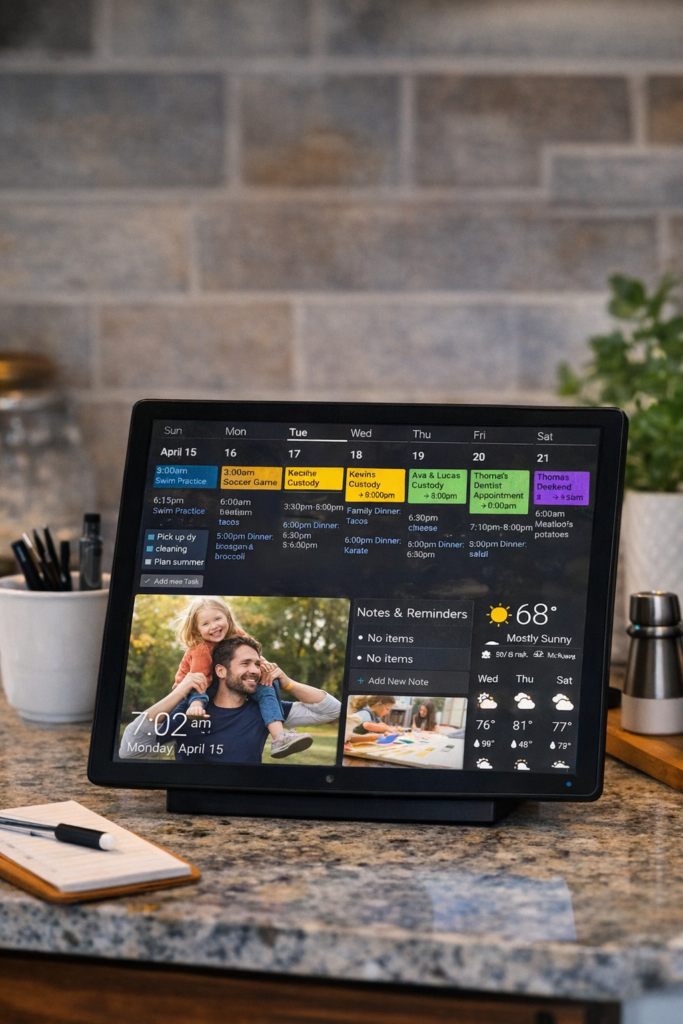
After developing the proof of concept, I moved the setup onto an older Raspberry Pi 4B running Ubuntu with Chromium to display the Dakboard on a touch screen in my kitchen. From there, it became part of daily life instead of just a tech experiment.
From Idea to Real-Life System
The original idea was simple: create one place where the most important household information could stay visible throughout the day.
Not buried in a phone. Not split across multiple apps. Not stuck in someone’s memory.
Visible.
Once I proved that the concept worked, the Raspberry Pi gave me an affordable and practical way to turn it into a permanent setup. Using Ubuntu and Chromium made it easy to run the dashboard full screen, and the touch screen made it feel natural in a kitchen environment where people are already moving, checking things quickly, and multitasking.
Why the Kitchen Was the Right Place
The kitchen is where a lot of life happens.
It’s where people pass through in the morning, stop during the day, and gather again in the evening. That made it the best location for a shared family dashboard.
Putting it there turned the Dakboard into more than a display. It became a quiet command center for the house.
What My Dakboard Displays
I’m currently using a mix of practical tools and visual information that support daily family life.
Google Calendar
The calendar is one of the most important parts of the board. It keeps schedules visible and helps everyone know what is coming up without needing to ask.
This is especially helpful for appointments, school events, family plans, and the general rhythm of the week.
Google Tasks
I also log into Google Tasks, which adds another layer of usefulness. This helps turn the board from a passive display into an active life management tool.
Instead of just showing what is happening, it also supports what needs to get done.
Google Photos
Google Photos keeps the board personal. Family photos rotating on the screen make it feel warm and lived-in instead of overly technical.
That balance matters. I didn’t want something that looked like a corporate dashboard mounted in the kitchen. I wanted something functional that still felt like home.
Weather
The weather block is one of those small features that ends up being surprisingly useful. Before leaving the house, it’s easy to glance at the screen and know what kind of day it is.
Whiteboard
The whiteboard area gives the setup flexibility. It’s a space for quick notes, reminders, and information that changes often.
This keeps the dashboard from being too rigid and makes it adaptable for real family life.
School Lunch Menu
This is one of my favorite practical touches.
Adding the school lunch menu means one more daily question gets answered before it even has to be asked. It helps with planning, expectations, and making mornings run a little smoother.
Time
Sometimes the simplest blocks are still essential. Having the time displayed clearly makes the whole dashboard even more useful at a glance, especially in a busy shared space like the kitchen.
Why This System Works So Well
The biggest benefit is not the technology itself. It’s the reduction in friction.
When information is clearly visible, you don’t have to go looking for it. You don’t have to remember everything. You don’t have to repeat as much.
It creates more shared awareness in the house.
That means fewer questions, fewer missed details, and a smoother daily rhythm.
It Turns Digital Tools Into a Home System
Most of us already use tools like Google Calendar, Google Photos, and Google Tasks. The difference here is that instead of those tools living separately on personal devices, they are brought together into one visible family system.
That changes how they function.
They stop being private apps and start becoming part of the environment.
Just because information is stored somewhere doesn’t mean it is truly accessible in daily life.
This setup makes that information visible in the moment and in the place where it is actually needed.
What I Like About Using a Raspberry Pi
Using an older Raspberry Pi 4B made this project affordable and practical. It gave new life to hardware I already had, and it was more than capable of handling a browser-based dashboard.
Running Ubuntu with Chromium kept the setup straightforward. It also made it easier to manage a full-screen experience for the touch display.
I like projects like this because they combine home organization with a little bit of hands-on building and problem solving. It’s not just about buying a system. It’s about creating one that fits your house and your routines.
What Started as a Proof of Concept Became Part of Daily Life
That’s probably my favorite part of the whole project.
What started as a test turned into something genuinely useful. The board now supports day-to-day family flow in a way that feels simple, visual, and sustainable.
It doesn’t solve everything, and it doesn’t need to.
It just makes life easier in the small, consistent ways that matter.
A Home Project That Supports Real Life
I love home projects that improve the way a house functions, not just the way it looks.
This Dakboard setup does exactly that.
It helps organize schedules, keeps practical information visible, adds warmth through family photos, and brings together several digital tools into one clear kitchen display.
It’s simple. It’s useful. And it has become part of the rhythm of our home.
Sometimes that’s what the best projects do — they quietly make everyday life run a little better.
Leave a Reply